Do you need an AI Kill Switch?
After reading this article, you will be able to list the requirements for an AI agent kill switch with unintended results.
SUMMARY:
An AI kill switch, or stop control, lets you rapidly pause, disable, or withdraw an AI system or agent when activities extend beyond the intended use.
To be effective, parameters should include who can trigger it, speed of onset, what happens to work already in progress, and reporting.
A plan should be in place as AI tools change over time.
An AI Healthcare Kill Switch Benefits
When an AI agent goes beyond its intended use, it can repeat the same error repeatedly before a report makes it evident.
Turning off the server or calling the vendor are backups, not a plan.
There are no U.S. regulatory specifications using the term Kill switch.
It is also referred to as stop control
Regulations address the expectation that organizations monitor and respond to AI safety events.
Common Mistakes
Relying on the vendor's off switch.
Lack of a fallback workflow without the AI system.
Lack of testing before go-live, at least once a year, with each software upgrade.
Pausing use of the AI agent without adequate documentation.
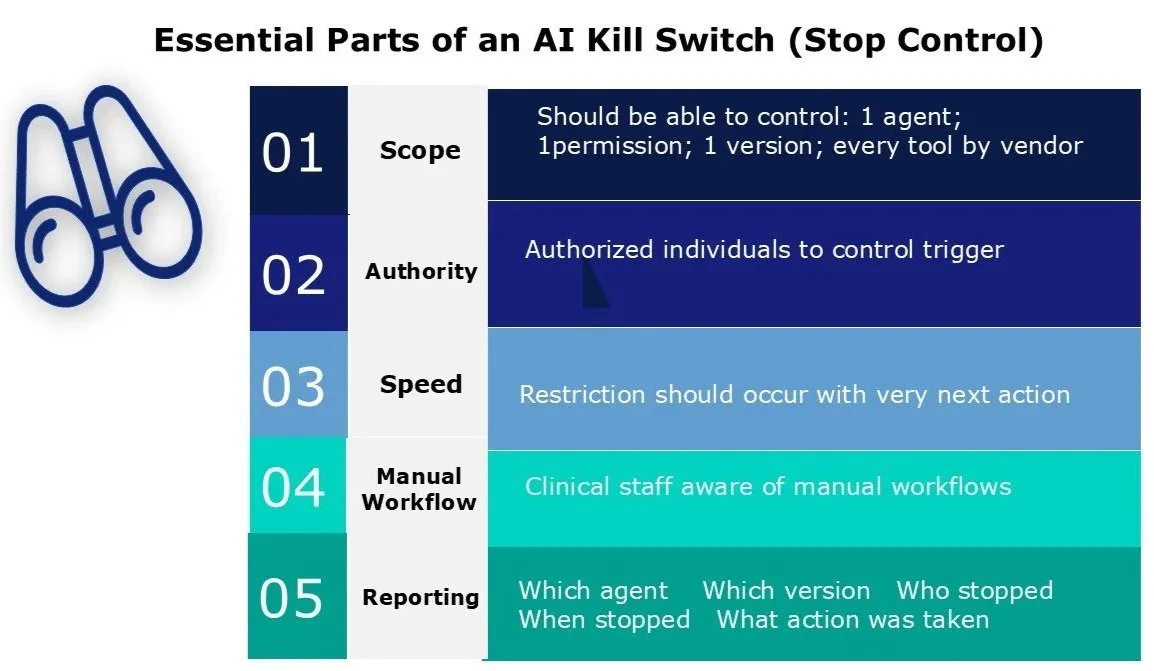
5 ESSENTIAL PARTS OF AN AI KILL SWITCH
SCOPE
Every major action an AI agent takes should pass through an internal permission check.
The kill switch (stop control) should be able to stop:
One AI Agent
One specific permission
One AI agent version
Every tool from a particular vendor
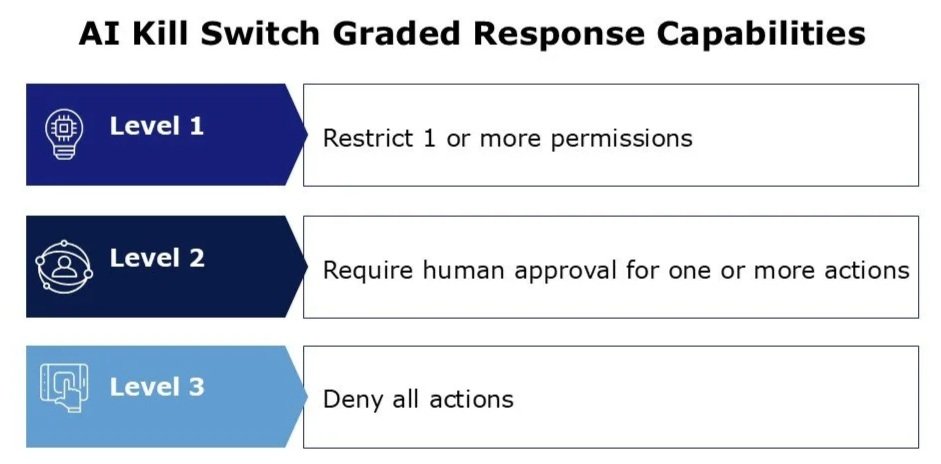
Not every problem will need a full stop. The ability to have a graded response is ideal.
LEVEL 1: Restrict 1 or more permissions
LEVEL 2: Requires human approval for one or more action(s)
LEVEL 3: Deny all actions
2. AUTHORITY– List of authorized individuals who can trigger the kill switch (stop control).
3. SPEED– Restriction should occur with the very next action until it is restored.
4. MANUAL WORKFLOW– Clinical staff must know which manual workflows to resume with the stoppage.
5. REPORTING– Should include:
Which AI agent was stopped
Which version
Who stopped the AI agent
When it was stopped
Why it was stopped – what did the agent do just before the stop
Actions taken after the stop
Who approved restoring the agent
Restoring the AI Agent
Restore with the narrowest permissions possible.
Monitor the initial cases/actions closely.
CONCLUSIONS:
Many AI agents are used before they can be effectively stopped. The use of kill switches should be tested before go-live.
Stopping an AI agent prevents new actions but does not undo past events.
The kill switch (stop control) stops an AI agent by revoking its authority at a specific point.
Very few healthcare organizations use automated product monitoring and use AI agents before they can stop them cleanly.